Leading the design of a 0-to-1 SaaS product at Kong that became a revenue growth engine.
Kong2024 – 2026
The challenge
Kong had a strong API platform, but customers still had to build too much of the experience around it. Most Kong customers needed a developer portal: a branded, self-service website where their customers and partners could find the right API, understand how it works, request access, get credentials, and start building without waiting on a sales or support team.
That left customers with two bad choices. They could roll their own, spending significant engineering time and resources rebuilding the infrastructure a developer portal requires, or buy from a Kong competitor.
The stakes
The opportunity was commercially significant and operationally messy: turn a collection of powerful infrastructure capabilities into a coherent, branded developer experience that organizations could easily launch and maintain.
Background
Triad
TravisPrincipal product designerJasonPrincipal product managerJilson and NateEngineering managers
My role
As Principal Product Designer, and later Design Manager, I owned the product vision, end-to-end experience, customer research, and design strategy. I partnered closely with Product and Engineering throughout development, worked alongside another product designer to bring the experience to life, and continued shaping the product and platform direction after launch.
The product
Kong Dev Portal extends Kong’s API Gateway by giving organizations a way to create branded developer portals for their own customers and partners. It brings API publishing, documentation, and content management into a single experience that helps those organizations’ external developers discover, access, and integrate with APIs.
Customer problems
1
Customers had built their developer portals from scratch, which took significant effort and maintenance.
2
They had to manage key workflows like onboarding, approvals, and provisioning access to a custom experience.
3
They also had to maintain security workflows and keep the portal up to date over time.
User research
I led the early user research that challenged our assumptions about the ideal customer profile. We expected portal admins to be full-stack software developers, but the people we spoke with were more often platform engineers, API product managers, technical writers, and back-end engineers. They needed basic visual customization, but they did not have front-end development skills.
I brought that evidence back to the team and influenced a fundamental shift in product direction: from a code-only experience to a layered model that let portal admins customize the visual experience directly in our UI.
Validation
I led customer validation with another product designer throughout pre-beta, beta, and GA, and continued gathering feedback as we developed post-GA features. At each stage, we used customer feedback to refine the design, sharpen the workflow, and ensure the product evolved in step with real customer needs. Validation artifacts available upon request.
Jobs to be done
We synthesized the research into a clear set of jobs to be done, transforming qualitative insights into a sharper understanding of what customers were really trying to accomplish.
When I publish a developer portal, I want it to reflect my organization’s brand and identity, so I can create a trusted and cohesive experience with my company’s website.When I customize my developer portal, I want to tailor its appearance without requiring front-end development skills, so I can launch quickly and maintain it easily.When I expose APIs to external users, I want to govern access without creating unnecessary administrative overhead, so I can scale securely.
Journey map
After launch, customer feedback surfaced confusion around the relationship between APIs and developer portals. Although the underlying architecture predated Dev Portal, we investigated the pain point, identified opportunities to reduce confusion, and worked with Product to prioritize several improvements immediately.
Designing the experience
Core flows
Portal setup – step 1
The portal setup flow guides customers through setting up their developer experience, including naming their portal and connecting APIs.
Credit: Julieta
Portal setup – step 2
After the basic setup is complete, customers customize the portal’s appearance. The right column shows a live preview of the default portal template with their branding applied.
Credit: Julieta
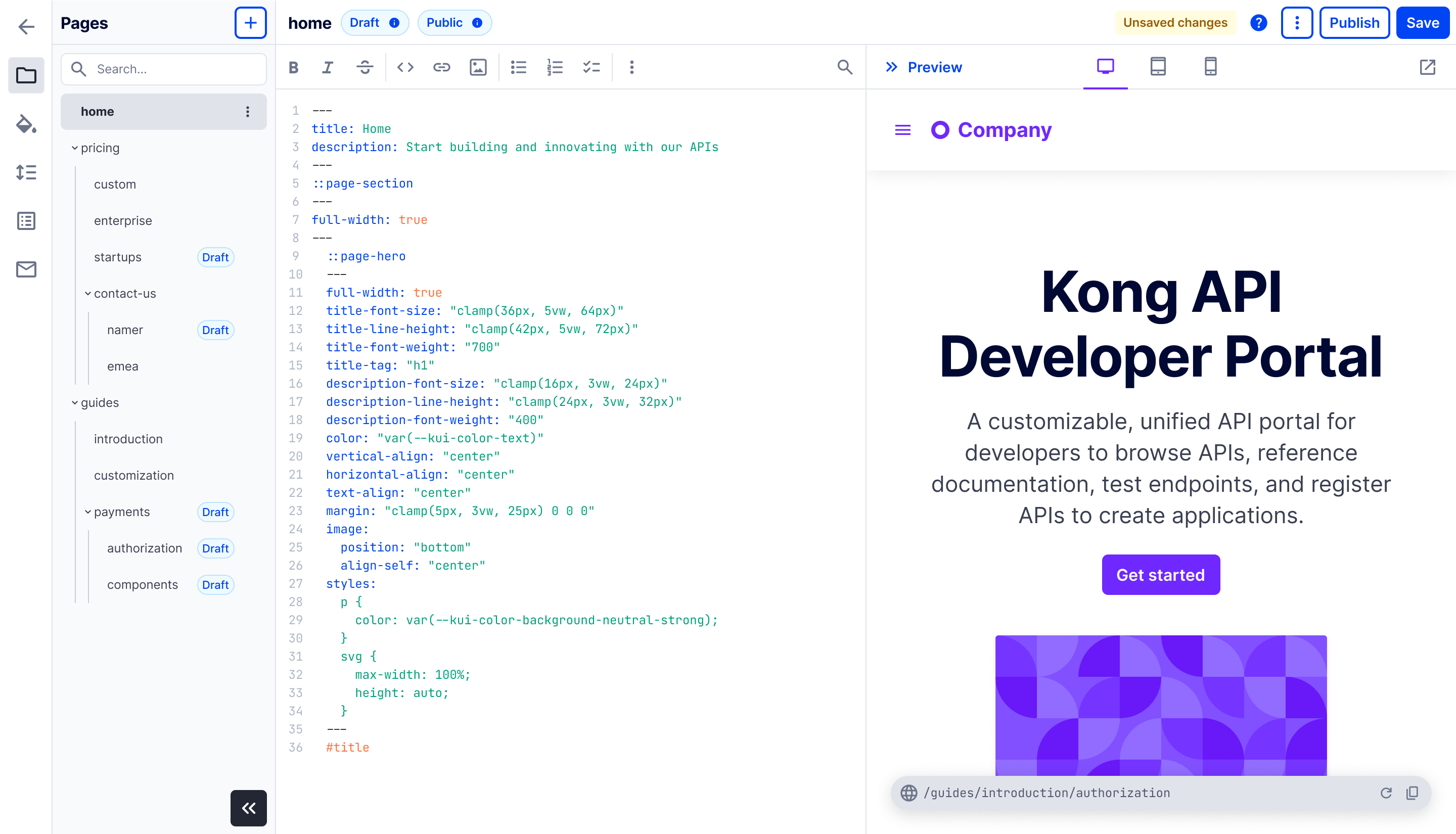
Portal editor
The portal editor gives API owners a flexible way to create documentation, publish markdown content, customize the portal experience, and preview changes before exposing them to developers. Customers start with a default template, a standard set of pages that provides sensible defaults and can be tailored to fit their needs.
Publish page
Once ready, customers publish their pages and make them available to portal users. They can choose to keep the pages public for anyone on the internet, or publish them as private pages restricted to approved, signed-in users.
Custom registration forms
Custom form
Custom forms enable portal owners to gather critical details from registrants, which is especially important when access is gated or when regulatory requirements must be met before users can reach an API.
In many cases, admins need to ask more about the registrant’s company so they can make an informed approval decision.
Field definition
Admins can create custom fields in a variety of formats, including dropdowns, text inputs, multiselects, terms acceptance, and more, to collect exactly the information they need.
Email customization
Email notifications
Admin often need to customize portal-generated emails, especially when access requires approval. This lets them add instructions or set expectations around how long approval may take.
The user-facing developer portal
Portal home
This is the default design of the published portal and serves as the dev portal’s entry point for external users.
Kong customers can fully customize the page’s look, feel, and content.
APIs page
API categorization and filtering make it easy for portal users to discover APIs in the portal. This becomes increasingly important at scale, especially for portals with more than 100 APIs.
Guide pages
Portal admins can create guide pages to help portal users understand and use their APIs. These pages can include components, tables of contents, graphics, and other rich text elements.
API spec
For each published API, portal users can view the OpenAPI specification to understand its capabilities and how to use it.
Get API credentials
After learning about an API, portal users can register to use it and receive the credentials they need to start making API calls. In some cases, they must first get approved before they can begin.
Impact
The bet paid off: a new commercial product turned Kong’s API infrastructure into an experience customers could launch, brand, and grow.
Based on customer insights and iterative design validation, we built and launched the first beta version of Dev Portal in March 2025, followed by General Availability in June 2025.
The product continues to expand with enterprise capabilities including authentication, security, environments, API versioning, and deeper platform integrations.
Enter password to view impact results.
Select customers
Impact beyond launch
As Principal Product Designer, I led the design strategy and end-to-end experience for a 0→1 commercial product from discovery through General Availability. I shaped the product direction through customer research, designed both the authoring experience and customer-facing developer portal, and partnered closely with Product, Engineering, and Design throughout delivery.
Beyond launch, the work continued to influence Konnect’s broader developer experience strategy. Research insights reshaped our approach to customization, informed roadmap priorities, and uncovered opportunities to improve API information architecture across the platform.
This project reinforced my belief that the highest-impact design work extends beyond the interface. It comes from using customer understanding to shape better products, stronger strategies, and more cohesive experiences.
 Kong
Kong 2024 – 2026