Building a visual workspace for designers

Building the visual editor that expanded Contentful into an entirely new market in content management.

Contentful2023–2024
Contentful Studio visual editor

The challenge

Contentful couldn’t sell to marketers, one of the biggest sources of budget for content management systems. Its structured platform worked well for content operations, but its rigidity made it feel like infrastructure rather than a product built for the campaign and digital experience work marketers needed to get done.

The stakes

We were missing out on a huge market and the budgets attached to it. This was not simply a feature opportunity; it was a chance to make Contentful relevant to the teams who shape, fund, and launch digital experiences.

The central conflict was difficult to resolve: marketers needed freedom and immediate feedback. I had to help the team make the editor compelling enough for marketing teams to adopt without giving up the content workflow that made Contentful valuable in the first place.

Background

Triad

TravisPrincipal product designer
Angela / LisaPrincipal product managers
MorganSr. Engineering manager

My role

As Principal Product Designer and design lead for Contentful Studio, I owned the product vision and end-to-end experience from early concept through launch. I led two designers, each embedded in triads, and partnered closely with Product and Engineering to evolve an early engineering-driven prototype into a polished visual editing experience.

I owned the core editor experience, including the information architecture, interaction model, drag-and-drop behavior, component workflows, layout systems, design system integration, and Figma workflows that became foundational to the product.

The product

Contentful Studio is a visual experience builder that extends Contentful's headless CMS, giving marketing teams and designers the ability to create flexible digital experiences using their organization's own content, components, and design system.

Unlike traditional page builders, Studio combines the creative freedom of a visual editor with the scalability of structured content. Developers maintain control through reusable components and design systems, while creative teams can visually compose and launch experiences without relying on engineering for every change.

Customer problems

1

Designers lacked the layout flexibility they needed to create bespoke campaign pages quickly in Contentful.

2

Marketers needed to move fast, but Contentful’s rigid content model slowed experimentation and limited adoption.

3

Developers needed a way to build reusable systems once, without owning every marketing campaign.

User research

When I joined the project, Studio was still in a pre-alpha state with a rough drag-and-drop experience. The target personas and jobs to be done were still unclear, and I had fundamental concerns about the editor’s usability. I initiated a research study to better understand customers’ mental models and evaluate the usability of the core editing experience.

Jobs to be done

My PM and I translated the research into a focused set of jobs to be done that captured the underlying goals, motivations, and challenges we heard from customers. This gave the team a shared understanding of the problems that mattered most and became a north star for product decisions.

When I need to create a new marketing experience, I want to use our existing design system and approved components, so I can maintain brand consistency while moving quickly.
When I create experiences for my organization, I want to build and iterate without depending on developers, so I can launch campaigns and updates ASAP.
When I need to create unique digital experiences, I want the freedom to design flexible layouts beyond rigid templates, so I can bring creative ideas to life without being constrained by our current design system components.
When I scale digital experiences across teams, markets, and languages, I want to reuse designs I have created, so I can efficiently manage complexity without rebuilding experiences from scratch.

Editor experience

Usability testing exposed a basic failure: the canvas could not be trusted. Drag-and-drop behaved unpredictably, users lost track of what had changed, and undo was unclear. Some testers deleted entire pages and started over. Routine edits had become guesswork.

Rough coded prototype for early canvas usability testing
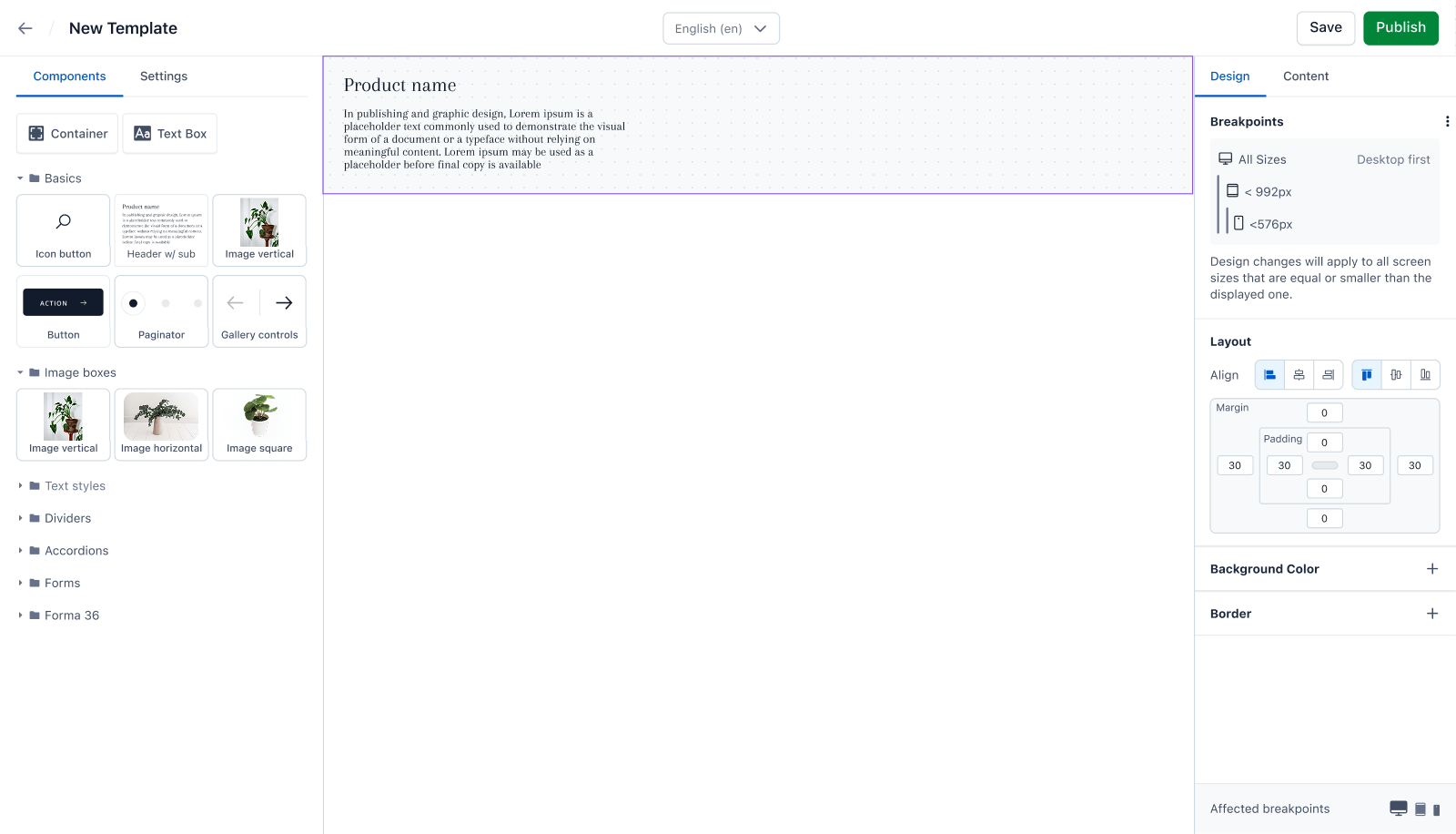
Rough coded prototype for early canvas usability testing

“I would probably never touch it again.”

“Is it the thing’s fault or am I stupid?”

“Moving stuff around was the biggest challenge I encountered.”

The findings reshaped our priorities. In close partnership with Product and Engineering, we agreed that the canvas experience needed deeper investment and shifted focus from adding new features to strengthening the editor’s core interactions.

Over the next three months, I worked with the team to redesign the canvas interaction model while Engineering rebuilt the drag-and-drop architecture from the ground up. Follow-up usability testing showed significant improvements in task success and satisfaction, validating the decision.

Design systems research

We initially assumed Studio could integrate directly with a customer’s design system. I led customer research that showed those systems varied widely in structure, maturity, and source of truth. Some lived primarily in Figma, others in Storybook, and many also relied on reusable production components that were never formally codified as part of a design system.

That insight changed our approach. Rather than treating the design system as one monolithic integration, we focused on the coded components themselves as the points of integration, wherever they lived. Through the SDK, developers could expose approved, production-ready building blocks in Studio, giving creative teams flexibility without sacrificing consistency or control.

Continuous improvement validation

Throughout development, we performed customer and partner validation to test the major design decisions behind Studio. We validated the core editor model, drag-and-drop interactions, component workflows, layout controls, and design system integration with the people who would ultimately use and implement the product.

This helped us move quickly without designing in a vacuum. Feedback from customers and partners shaped multiple iterations of the experience, especially around making the editor feel intuitive, predictable, and powerful enough for creative teams while still preserving the structure and control enterprise customers expected. By the time Studio launched, the product had been continuously tested against real workflows.

Designing the experience

The editor

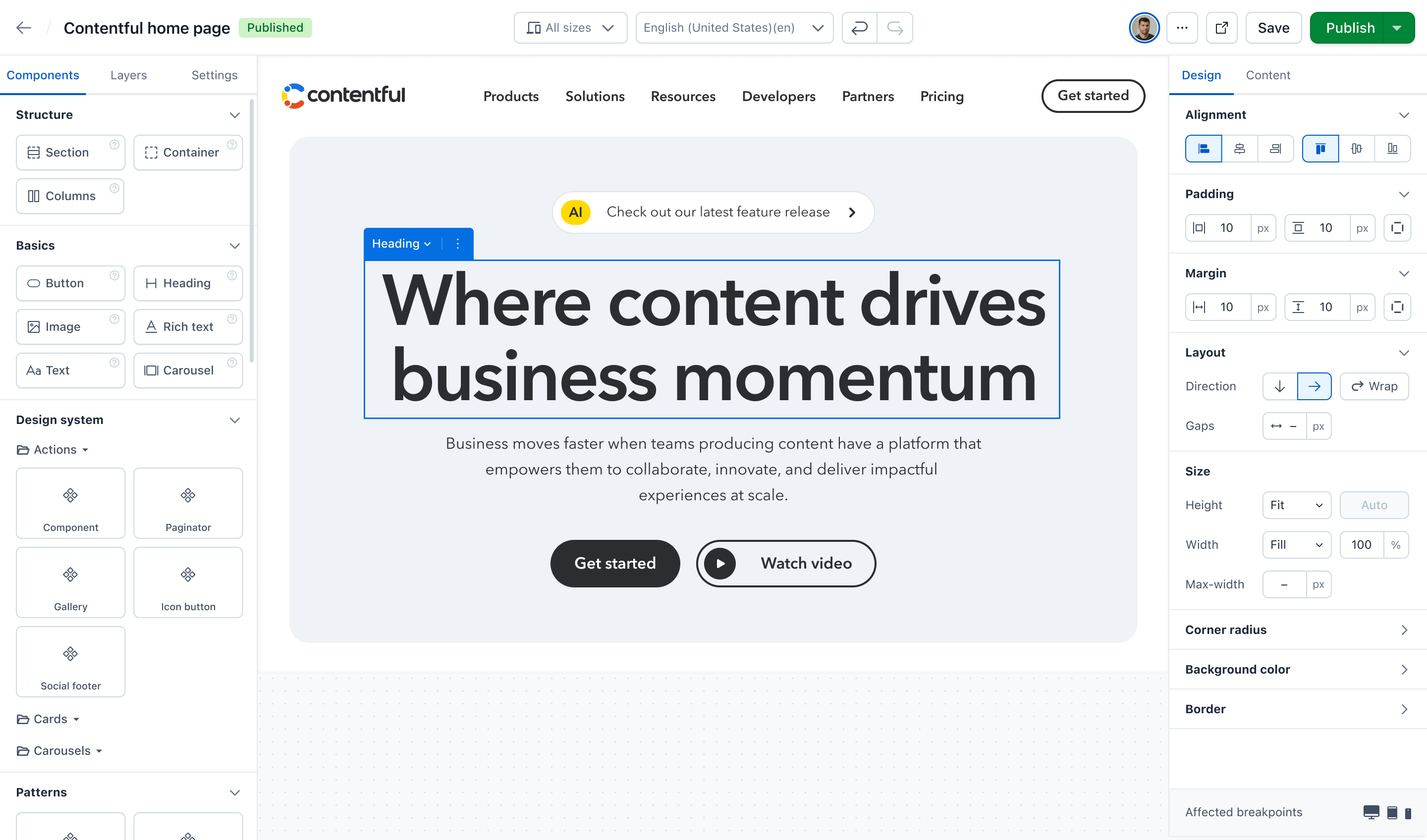
We rebuilt the drag-and-drop experience so marketers and designers could assemble pages using built-in components, design system components, and reusable patterns.


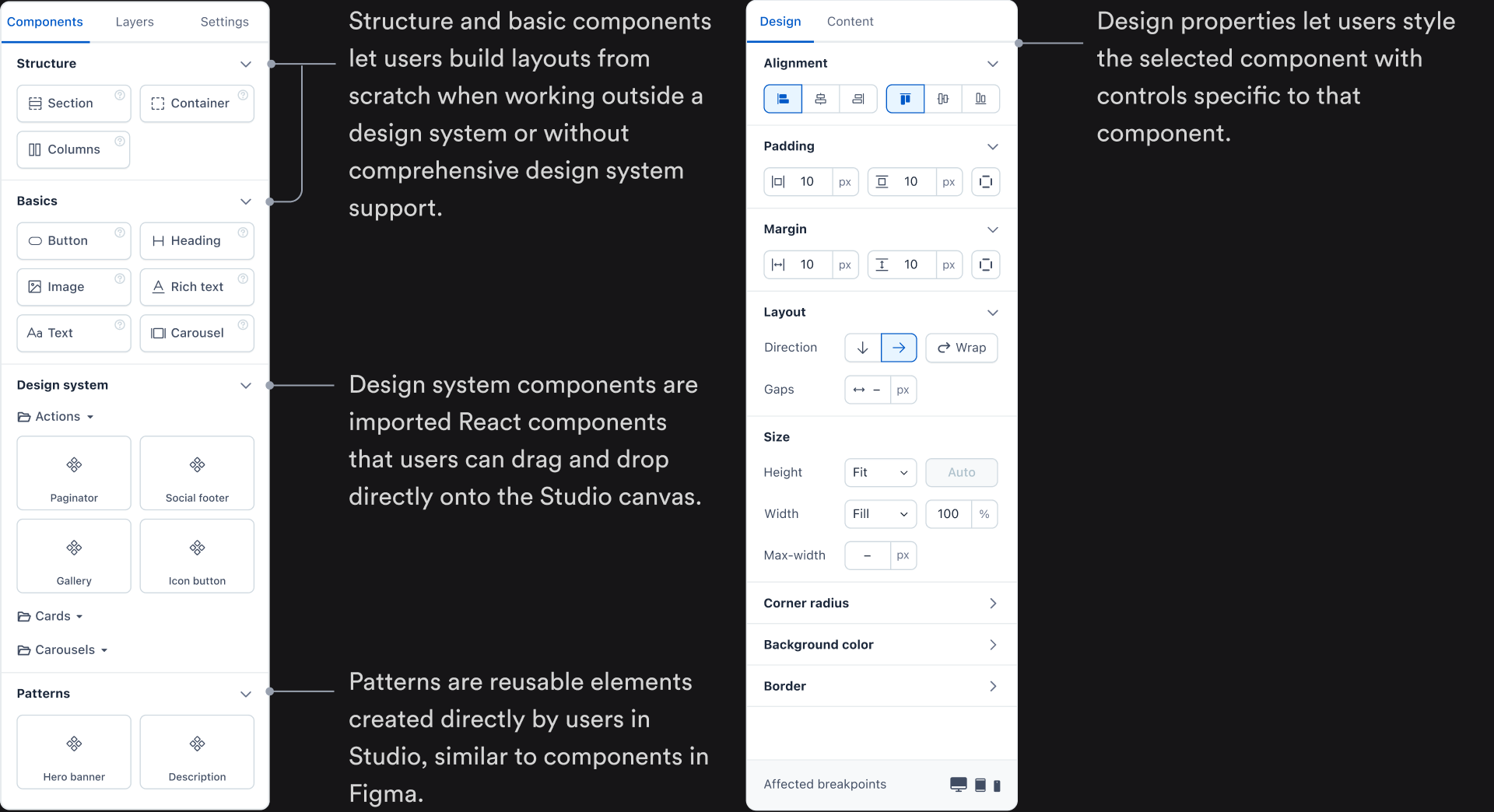
Components and design properties

Beyond drag and drop, components and design properties are the editor’s most frequently used features.

Contentful Studio component and design properties

Making drag and drop feel natural

Canvas drag and drop interactions

Based on our research and ongoing experimentation, I collaborated closely with Engineering to redesign the canvas drag-and-drop experience, making it more intuitive, predictable, and easy to use.


Layers drag and drop interactions

Beyond canvas drag and drop, we introduced a secondary way to move elements when users were working with deeply nested structures and needed more precise control over placement. This hierarchy-based experience used vertical drag and drop, making it easier to move components to an exact location within the page structure.

Columns component

Columns

The Columns component addressed a top customer need for multi-column layouts, especially for teams without basic layout components in their design systems. Usability testing showed that customers found it intuitive and well suited to their needs.


Columns interaction demo

I shared this in-progress Columns prototype with Design, Product, and Engineering to gather async feedback.

Carousel component

Carousel interactions

The Carousel addressed a common customer need that was technically difficult to support through imported design system components. We built a native version with drag-and-drop slots, nested-content controls, and unstyled placeholder content so users could start from a useful structure instead of a blank slate.


Carousel interaction demo

I shared this in-progress carousel prototype with Design, Product, and Engineering to gather async feedback.

Information architecture

As a net-new product, Studio didn’t have a natural place in Contentful’s existing navigation. Because Studio was built on top of Contentful’s data model, the pages and components created in Studio were linked to the content models behind them. I explored multiple IA approaches, from different integration models to more fully separating the experiences. We ultimately added Studio to the main Contentful navigation as the least disruptive option and the clearest way to preserve those relationships.


Studio experience management

The Experiences page gives users a visual way to manage pages and patterns created in Studio. Unlike Contentful’s traditional content views, it leads with visual previews to better reflect the visual nature of Studio, an approach that tested well in usability studies.


Setup wizard

The setup wizard was a critical activation step, helping developers quickly configure the Studio SDK in a live environment so Studio could become functional.

Driving unification through vision

Outside the immediate scope of Studio, our team and customers kept surfacing a related but disconnected job to be done: editing existing structured content. Studio was designed primarily for visual composition, linking to existing content, and creating ad hoc content, but customers still had to leave that experience to manage structured content elsewhere in the platform.

I created a vision prototype to explore how those workflows could come together into a more seamless, customer-centered experience. Rather than treating visual creation and content editing as separate product problems, the concept reframed them as parts of the same end-to-end job.

I shared the prototype with Product leadership and teams across the company. It helped make the opportunity tangible, created alignment around a broader product direction, and became a catalyst for cross-team collaboration around how Contentful could better connect visual creation with structured content editing across the platform.

Impact

Contentful Studio launched as the company’s second standalone product, opening a major new growth opportunity beyond Contentful’s traditional headless CMS business. It expanded the platform to an entirely new audience of marketers and creative teams, transforming Contentful from infrastructure for managing content into a platform for visually creating digital experiences.

Within its first year, Studio generated more than $1M in revenue and became a strategic pillar of Contentful’s product portfolio. More importantly, it validated a broader shift in the company’s strategy: empowering entire digital teams, not just developers, to build and launch experiences on Contentful.

Studio has since grown into a multimillion-dollar business and an increasingly central part of Contentful’s platform strategy. That evolution helped reposition the company within the much larger digital experience market and contributed to the strategic foundation that ultimately made Contentful an attractive acquisition target for Salesforce.

$0m+Revenue within 6 months of launch
Multimillion dollarARR business established

Select customers